Everything on Auto-Pilot: Avenue Changelog October 2026
What's New: Everything on Auto-Pilot.
This month, more of your site runs without you: your listings post themselves to Facebook and Instagram, your old blog posts come with you, and your dashboard tells you how things are going before you click anything.
Everything below runs on newer Avenue sites. If your site is older and you want these features, email us about getting a new one.
Your listings, posted to Facebook and Instagram
What changed. Avenue can now post your listings to Facebook and Instagram on its own, with a caption written for you and the listing's photos. Connect your accounts, pick the listing events to post about, and choose whether posts wait for your review.
Why it matters. A new listing usually means writing the same caption twice, once for each app, somewhere between showings. Now it goes out on its own.
What to do. Open Social in your dashboard and connect your Facebook and Instagram accounts.

A dashboard that answers first
What changed. Your dashboard home now shows your SEO score, your latest social posts with whether your accounts are connected, and how many active and sold listings are on your site.
Why it matters. Checking on your site used to mean clicking through your SEO score, your social accounts and your listings one at a time. Now all three sit on the page you land on.
What to do. Nothing to set up. Log in and it's the first thing you see.

Your blog, including the old posts
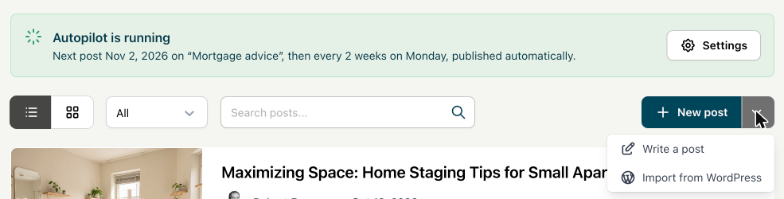
What changed. If you've been blogging on WordPress, you can now import those posts into your Avenue blog.
Why it matters. A post you wrote two years ago about your neighbourhood can still bring people to your site. Starting your blog over would throw that away.
What to do. Open Blog in your dashboard and start the import there.
Also landed with it:
- Images inside posts. Drop a market stats graphic or a listing photo anywhere in the body of a post, not only at the top.
- An RSS feed. Your blog now has one, so readers and apps that follow RSS pick up new posts automatically.

More ways to show your testimonials
What changed. The grid and list testimonial layouts have a new card style. Pick the card's accent colour from your site's theme colours, and add a background image if you want one. The previous styles are still there if you prefer them, and the testimonials manager in your dashboard uses the new card design.
Why it matters. You probably picked a testimonial layout when your site went up and haven't thought about it since. Your clients' words now have more than one way to show up, and the original look is still there if you liked it. You get to choose.
What to do. Open your testimonials section in the builder and switch it to the card style.
Your website
- Tracking on every form. If you run your own ads, every form can now track an event when someone submits it. If you'd rather have us run your ads so you don't need to worry about them, reach out to chat.
- A custom submit button on Home Evaluation forms, the same way you could already change it on regular forms.
- Your office's listings. A Listings section can now show listings from your office, not only your own.
- Full-width listing slider. Listings can now show as a full-width slider instead of a grid.
- Left-aligned titles in text blocks. Text blocks have a left-aligned title style, and the buttons line up under the title text.
- Instrument Sans and Instrument Serif join the font set in the builder.
That's everything for October. If you have a question about any of it, email help@avenuehq.com.

See what Avenue can do for your business.
Start with a free website, or talk with our team about the right setup for your business.
